<?xml version="1.0" encoding="utf-8"?>
<feed xmlns="http://www.w3.org/2005/Atom">
    <id>https://www.dompajak.com/blog</id>
    <title>Dom Pajak Blog</title>
    <updated>2024-04-07T00:00:00.000Z</updated>
    <generator>https://github.com/jpmonette/feed</generator>
    <link rel="alternate" href="https://www.dompajak.com/blog"/>
    <subtitle>Dom Pajak Blog</subtitle>
    <icon>https://www.dompajak.com/img/8bitkick.png</icon>
    <entry>
        <title type="html"><![CDATA[WebXR BBC Micro (XR Beeb)]]></title>
        <id>https://www.dompajak.com/blog/webxr-beeb-virtual-beeb</id>
        <link href="https://www.dompajak.com/blog/webxr-beeb-virtual-beeb"/>
        <updated>2024-04-07T00:00:00.000Z</updated>
        <summary type="html"><![CDATA[You can build from your childhood dream in immersive 3D and share it with the world in a website! To me, that is amazing.]]></summary>
        <content type="html"><![CDATA[<p>You can build from your childhood dream in immersive 3D and share it with the world in a website! To me, that is amazing.</p>
<p>This is a story of how I fell in love with Three.js &amp; WebXR, the value of creative side-projects, and the people who helped me along the way in creating <a href="https://xr.bbcmic.ro/">XR Beeb</a>.</p>
<p>Buckle up, the journey is a long and bumpy one…</p>
<h2 id="background">Background</h2>
<h3 id="my-first-computer">My first computer</h3>
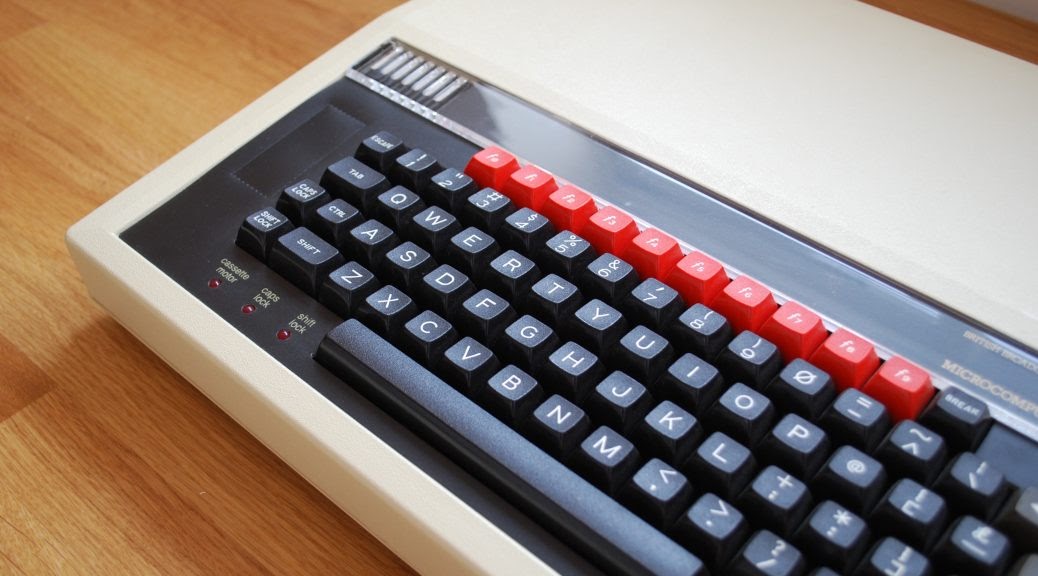
<p>The ‘80s were a simpler times.  Your computer only knew what you told it about yourself. You switched it on and it instantly greeted you with a prompt. No in-app purchases, no tracking, no ads. That honesty and immediacy is something tech should still aspire to.</p>
<p>And because few adults had used a computer before, kids were on the forefront. There’s a whole generation of innovators in the UK who were <a href="https://www.nesta.org.uk/report/the-legacy-of-bbc-micro/">inspired by this formative experience with a BBC Micro</a> or ZX Spectrum at school or home.</p>
<p><img alt="BBC Micro" src="https://www.dompajak.com/assets/images/beeb-6c1e3973256dfdb9157cae19a4c29d8e.jpg" width="1038" height="576"></p>
<h3 id="peak-retro">Peak retro</h3>
<p>One unexpected result of the COVID-19 pandemic was a <a href="https://www.nytimes.com/2021/01/08/style/retrocomputing.htm">boom in retrocomputing</a>. Prices of yellowing plastic electronic junk surged on eBay. People stuck at home found an escape in nostalgia for those simpler times - and a new online community.
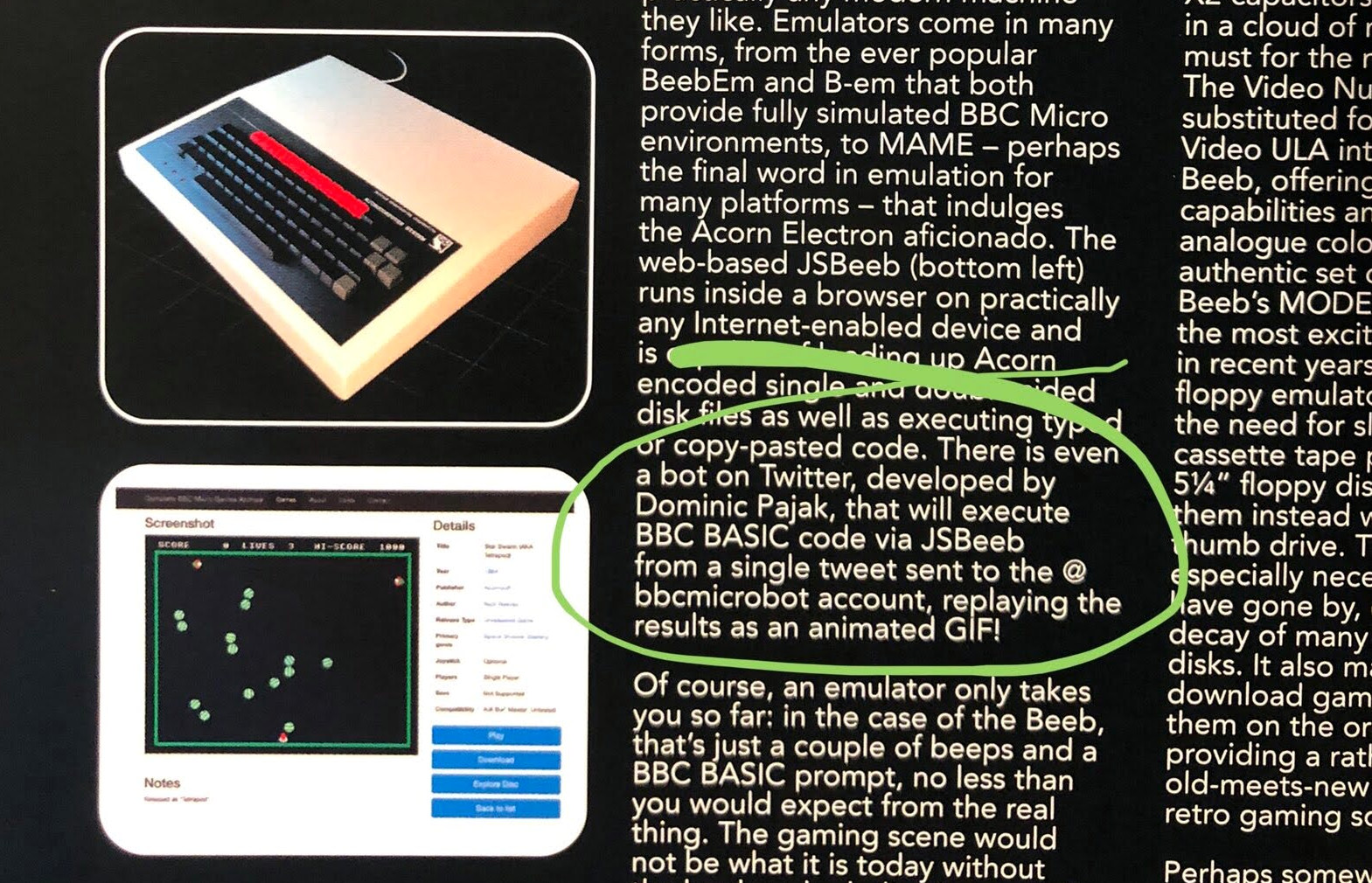
Although it would take me until 2024 to actually get around to finish, the XR Beeb project was born of these circumstances. I saw a Tweet from fellow beeb fan <a href="https://makezine.com/author/david-groom/">David Groom</a> saying that I was mentioned in a <a href="https://www.idesine.com/products/acorn-a-world-in-pixels-book-bbc-micro-acorn-electron-1">book</a>. Yep, I'd finally made it. There was a one sentence mention of me lurking near the back. On the same page was a render of a BBC Micro:</p>
<p><img alt="Book" src="https://www.dompajak.com/assets/images/book-20ad2550e8e9a7642f9dc19d193554c2.jpg" width="1569" height="1010"></p>
<p>The book mentioned <a href="https://www.bbcmicrobot.com/">BBC Micro Bot</a> - another pandemic era side-project I built in 2020, using <a href="https://xania.org/">Matt Godbolt</a>’s groundbreaking emulator-in-a-browser, <a href="https://bbc.xania.org/">JSbeeb</a>. That’s a whole other <a href="https://www.youtube.com/watch?v=ri57oPiyE_g">story</a>. I guess what’s relevant here is it meant I knew how JSbeeb worked.</p>
<p>Seeing the BBC Micro render in the book, it struck me - I could bring that 3D model to life! Although it's only rendered as a 2D plane, JSbeeb’s screen is actually a <a href="https://github.com/mattgodbolt/jsbeeb/blob/main/canvas.js">WebGL texture</a>. So I could put the two together with Three.js and have a full interactive 3D simulation of the machine in a browser! It wouldn’t even take long to hack together - let’s go!</p>
<p>It was approaching the 40th Anniversary of the BBC Micro; just enough time to build a free 3D web simulation for web (later dubbed Virtual Beeb) and get it out for the anniversary in December 2021 as a tribute to our favorite computer.</p>
<h2 id="3d-model">3D Model</h2>
<h3 id="blender-model">Blender model</h3>
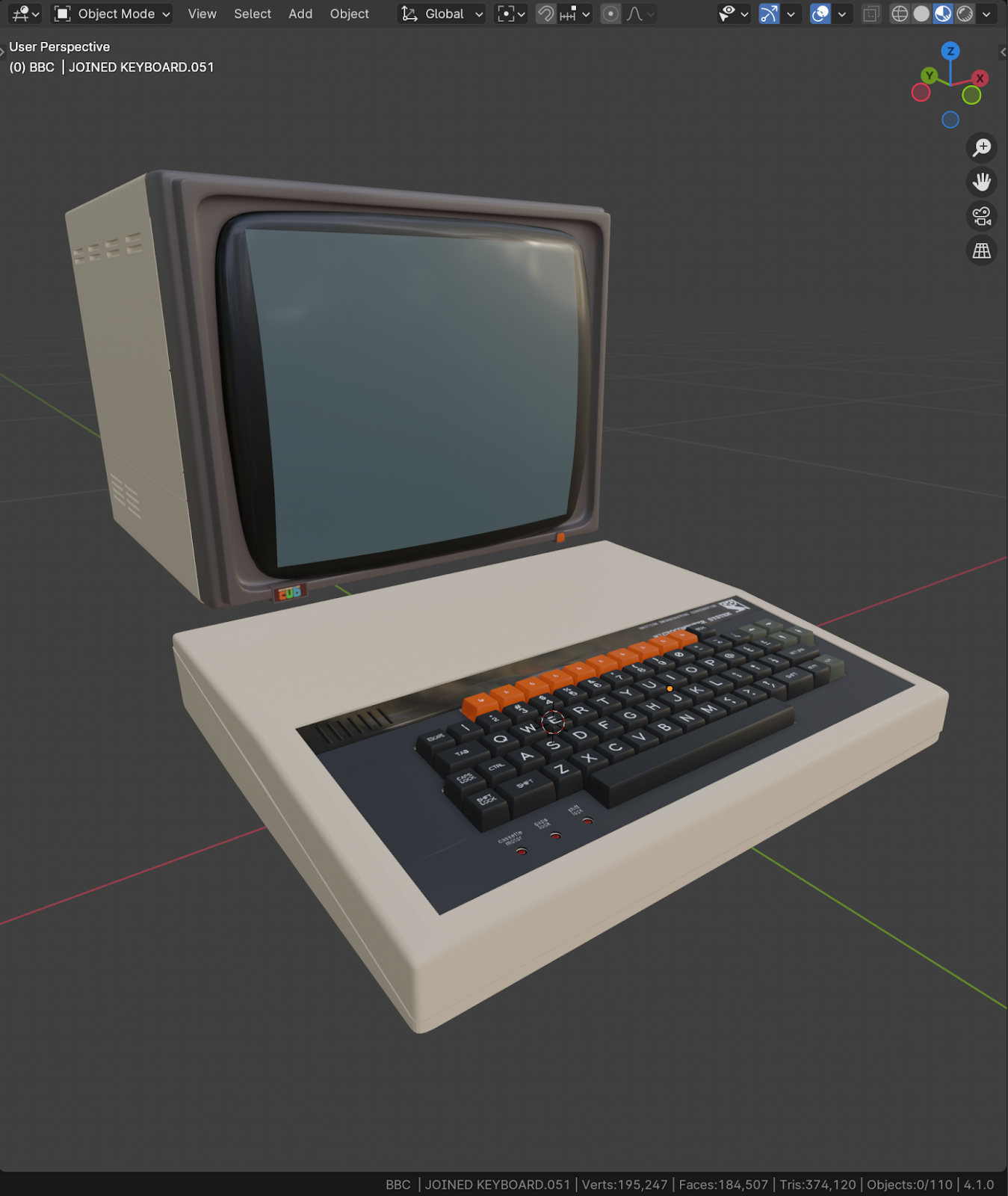
<p><img alt="JSBeeb" src="https://www.dompajak.com/assets/images/model-f09340551d373824469b3e3c9da6e021.png" width="1349" height="1600"></p>
<p>I contacted artist <a href="https://merkerwork.co.uk/">Ant Mercer</a> to get permission to use the excellent Blender model he’d created for IDESINE’s book <a href="https://www.idesine.com/products/acorn-a-world-in-pixels-book-bbc-micro-acorn-electron-1">Acorn: A World In Pixels</a> so I could export it as a GLTF and into a Three.js webpage.</p>
<p>I then built a proof of concept with the JSbeeb emulator live updating the texture of the screen of the BBC Micro model in less than a day - it looked a little rough, but it was magic!</p>
<p>BBC Micro Bot had earned me an honorary membership of <a href="https://bitshifters.github.io/">Bitshifters</a> from another source of inspiration, <a href="https://www.developconference.com/advisory-board/kieran-connell">Kieran Connell</a> - most of the crew are veteran games developers, and so their feedback and advice on the Virtul Beeb prototype was gold. The glimmer of coolness I’d built was enough to inspire my open-source emulator hero and Compiler Explorer creator Matt Godbolt to volunteer to help out. Computer graphics guru <a href="https://blog.mousefingers.com/about/">Paul Malin</a> also lent his shader skills and expert eye to the project.</p>
<h3 id="keycap-stls">Keycap STLs</h3>
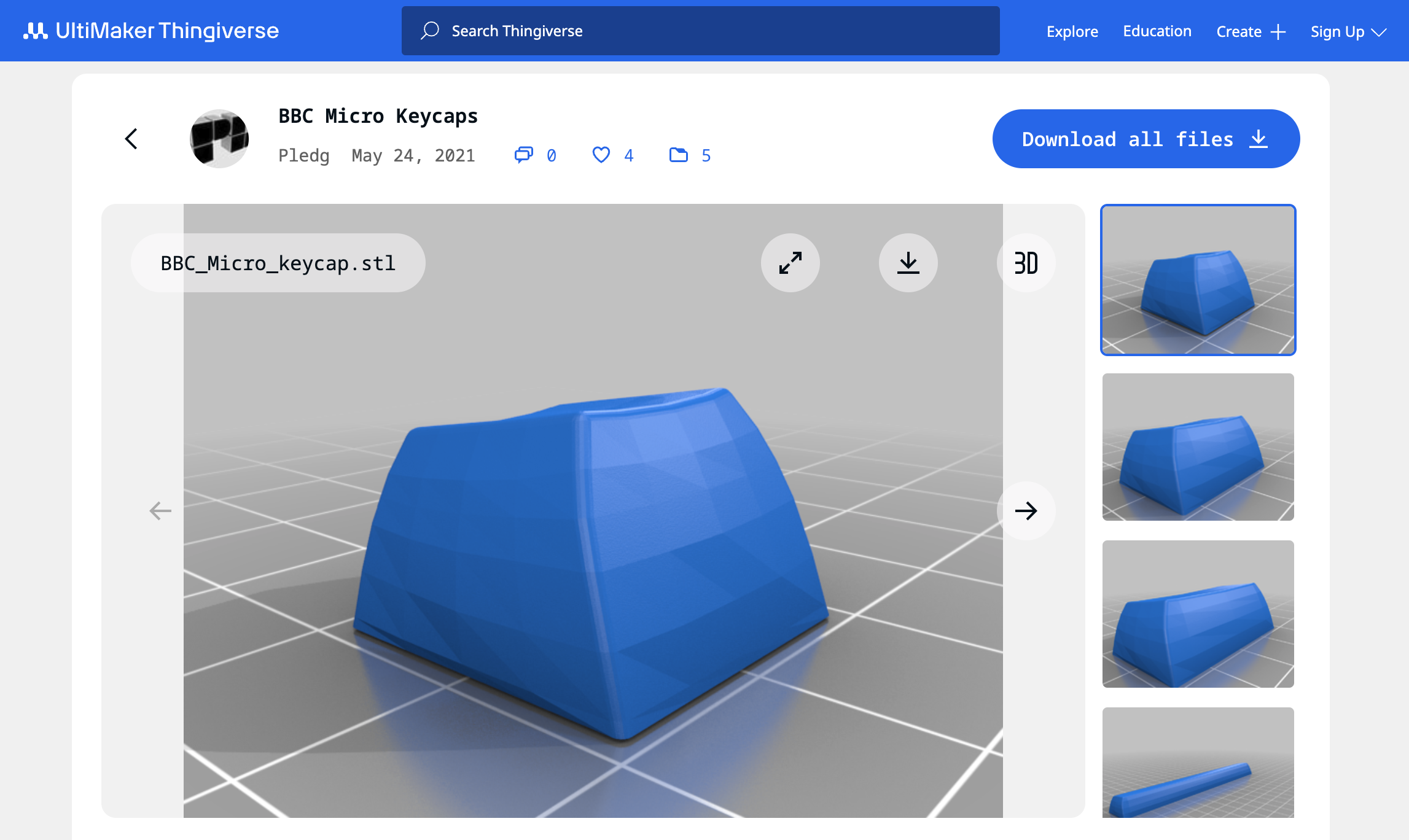
<p><img alt="Keycaps" src="https://www.dompajak.com/assets/images/keycaps-075c3518bc27f21a7bbb4811af916e4f.png" width="2294" height="1368"></p>
<p>The original Blender model was initally used without much modification - except for some additional textures, material tweaks (for GLTF compatibility) and polygon reduction. But I eventally found more accurate spherical keycap models by Paul Ledger on <a href="https://www.thingiverse.com/thing:4867915">Thingverse</a> (intended for 3D printed replacements of real keys!), and implemented them as an <a href="https://three.js.org/docs/#api/en/objects/InstancedMesh">instanced mesh</a> to save on draw calls to optimize for WebXR.</p>
<h2 id="sound-design">Sound design</h2>
<h3 id="samples">Samples</h3>
<p>The BBC Micro’s mechanical keyboard gave the machine an iconic look - and sound.
I recorded samples of key presses of each size of key at varying velocities. Matt did a whole load of work hooking things together including (vitally) the keyboard and pointer interaction for Virtual Beeb. Most satisfyingly, the user could drag their pointer across the mechanical keys and you’d hear a sound like a cat pawing around on it. The clacky mechanical keyboard sounded great!</p>
<p>I've since seen claims all 72 keys were sampled individually; but even I'm not that obessive! (Although close) There were 18 samples in total. The samples consisted of a 1U key (i.e. regular key size), a ~2U key (Shifts, Tab and Return), and an 8U key (Space bar). Each was sampled with upstroke and downstroke sounds separately, at 3 different velocities to avoid an unnaturally repetitious ta-ta-ta in the simulation and add some realism.</p>
<h3 id="positional-audio">Positional Audio</h3>
<p><img alt="Audio" src="https://www.dompajak.com/assets/images/audio-676259d99d8159e3f453aabc10905f73.png" width="3196" height="1704">
For the WebXR port I implemented the same 18 audio samples, but this time used Three.js <a href="https://three.js.org/docs/#api/en/audio/PositionalAudio">Positional Audio</a>.</p>
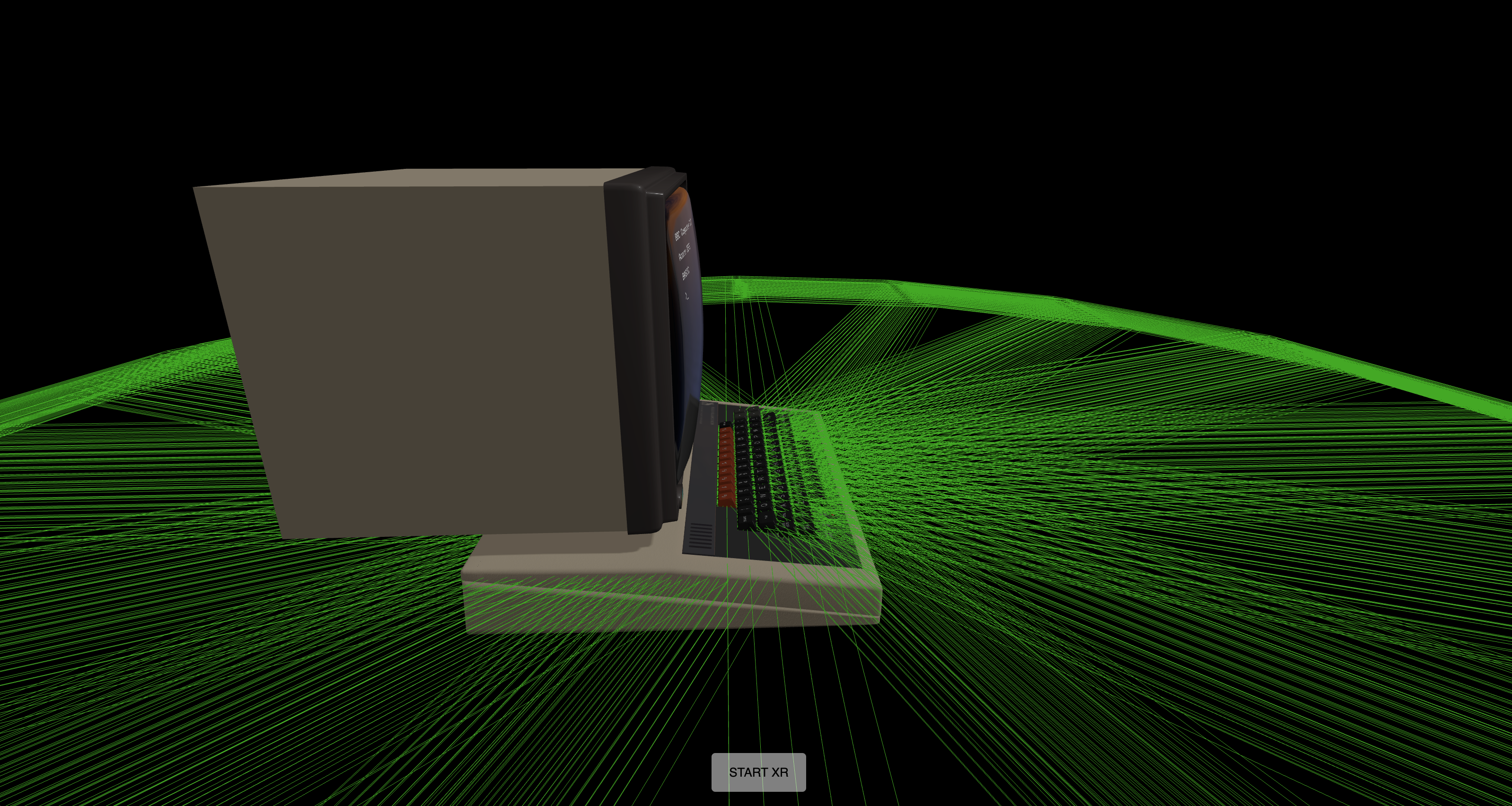
<p>Every single one of the 72 keys had a positional audio object attached, so a unique position for the sound of it being pressed triggered in immersive 3D space. You can see these positional audio helpers in green wireframe in the image (this was only visible during development).</p>
<h2 id="shaders">Shaders</h2>
<p><img alt="Book" src="https://www.dompajak.com/assets/images/crt-cfff53b2b524fc5af48806ad5940ba8e.png" width="1600" height="836">
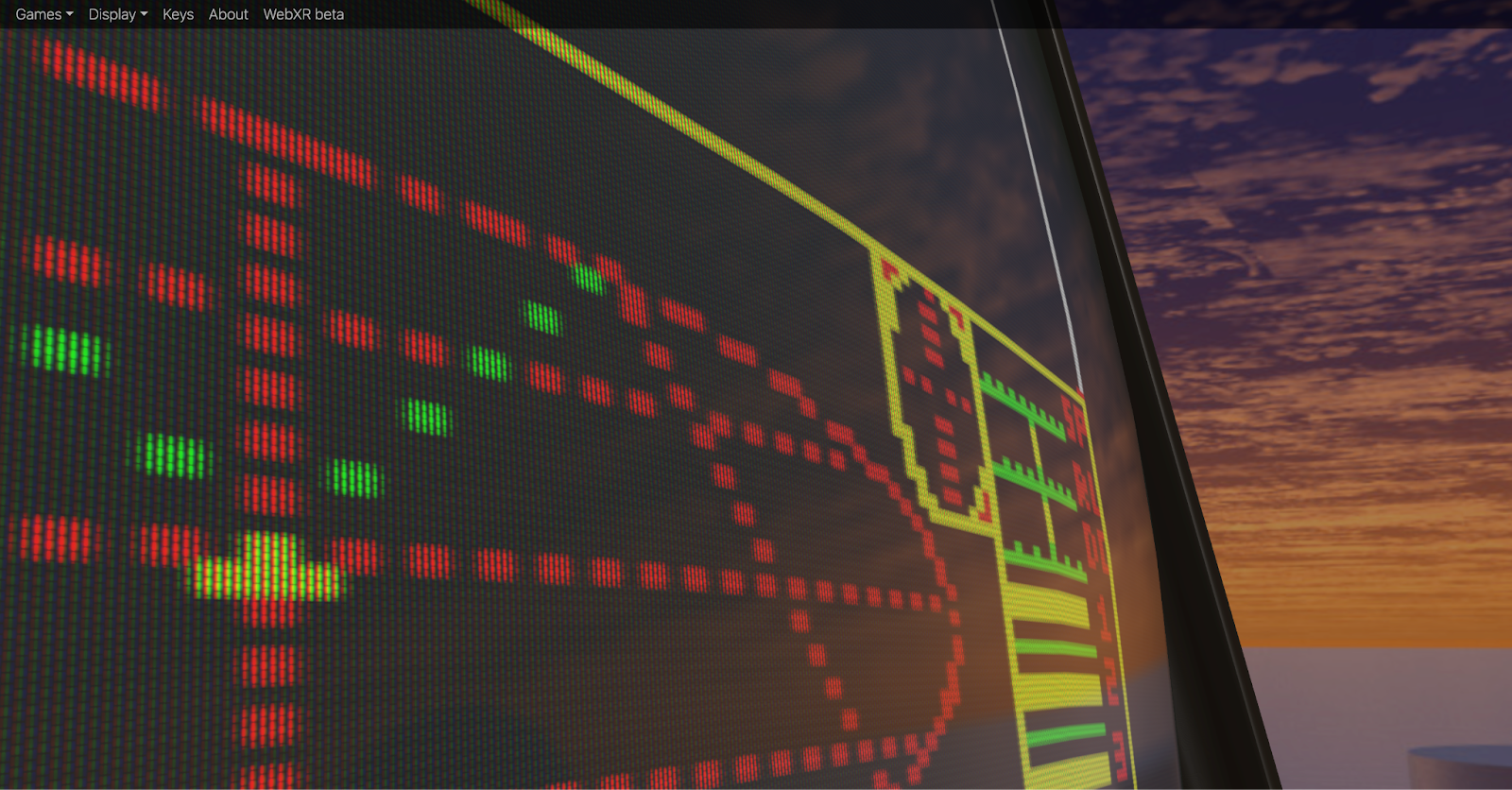
One of the most visually impressive aspect was the CRT shader created by Paul Malin in GLSL - you can zoom in and see the phosphor dots and rippling noise in the virtual CRT screen! The realism of the CRT shader is still the best I’ve seen in any model.</p>
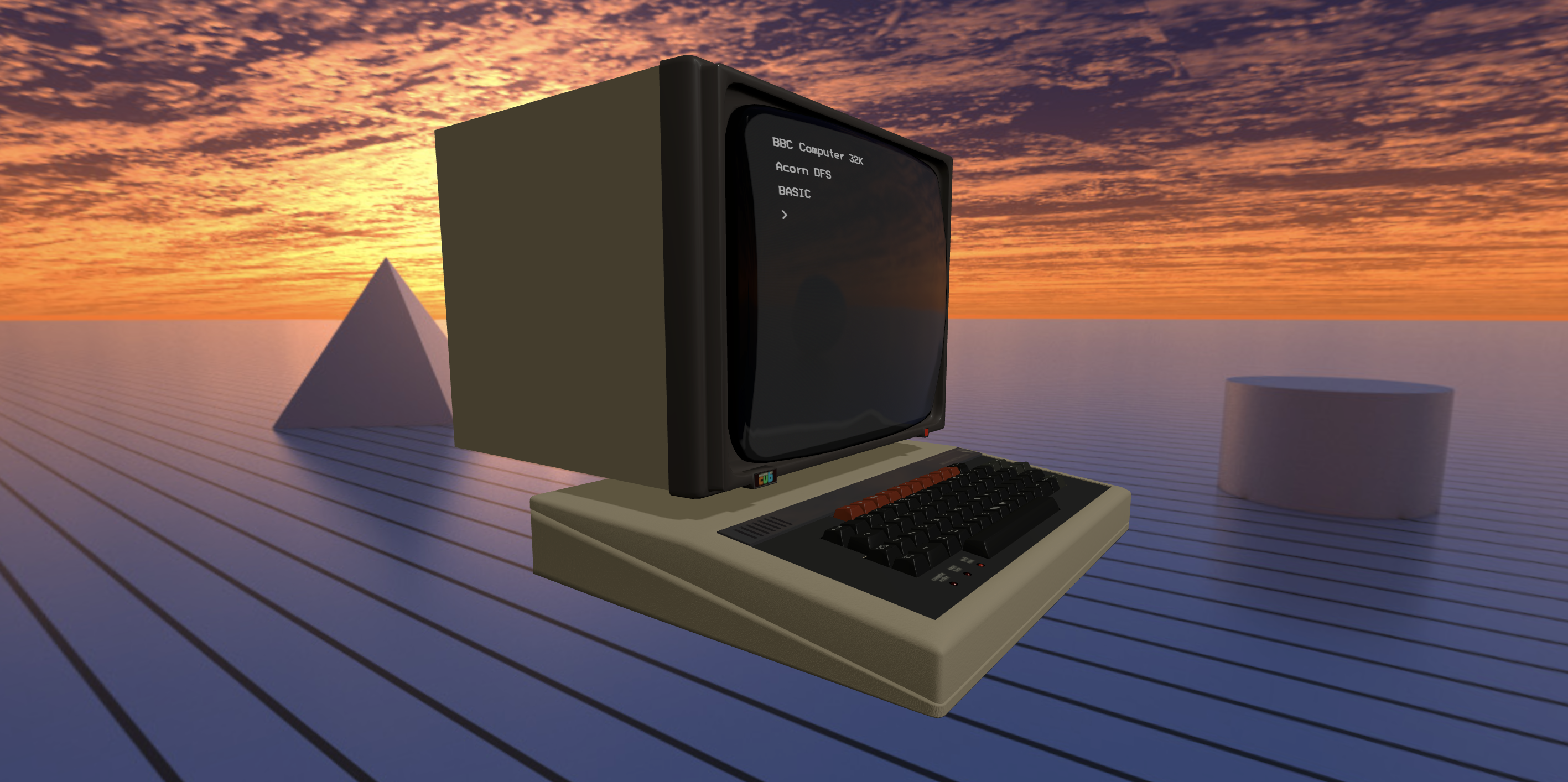
<p>The background was equally cool. Instead of some ‘80s style bedroom scene, the machine was in a retro futuristic landscape under a flaming sunset, just like in the Acorn adverts at the time. The feeling of using the machine back then was futuristic - that’s the feeling I was trying to capture in Virtual Beeb - and Paul’s shader really made it work.</p>
<h2 id="first-launch">First launch</h2>
<p>Having got the help of two world-class developers in Matt and Paul, we were able to crunch out a release in a matter of weeks. Not only was it fully working, it looked stunning! It got huge traction online and fittingly also featured on BBC Television. The (non-VR) Virtual Beeb is still online at <a href="https://virtual.bbcmic.ro/">virtual.bbcmic.ro</a> - it’s still getting around 5K users per month.</p>
<p>The project, against the odds, was a resounding success. You could argue I could have left it there...</p>
<h2 id="enter-vr">Enter VR</h2>
<p>The reaction to Virtual Beeb was great, the project was a success, and over.</p>
<p>But one response to the announcement caught my eye:

<img src="https://www.dompajak.com/assets/images/vr-button-74a78bbdb4c77fe4beda38d89d0aa450.png" width="888" height="205"></p>
<p>It was my favorite library, Three.js, suggesting I add VR capability to the project!</p>
<p>This inspired me to get a Meta Quest 2 for Christmas, and in January I added the VR button, and hey presto, it reall did 'just work'! The magic of Three.js meant I only needed to add <a href="https://three.js.org/docs/#manual/en/introduction/How-to-create-VR-content">a couple of lines to give the project immersive VR support</a>.</p>
<p><img alt="VR" src="https://www.dompajak.com/assets/images/vr-fd4a24b004a18660dea56f91bd90ad47.png" width="2834" height="1414"></p>
<p>It was amazing to be able to walk inside the project in VR. I was actually standing in Paul Malin's retrofuturistic landscape, looking at a ‘solid’ BBC Micro suspended in space. I could feel the weight of the machine and the static crackle of the CRT monitor as I put my face near it. Really, really cool.</p>
<p>The bad news - a whole new interaction method was needed to actually do anything with it. I’d just started a new job and the holidays were over. The side project went back on the shelf.</p>
<h2 id="hand-tracking">Hand tracking</h2>
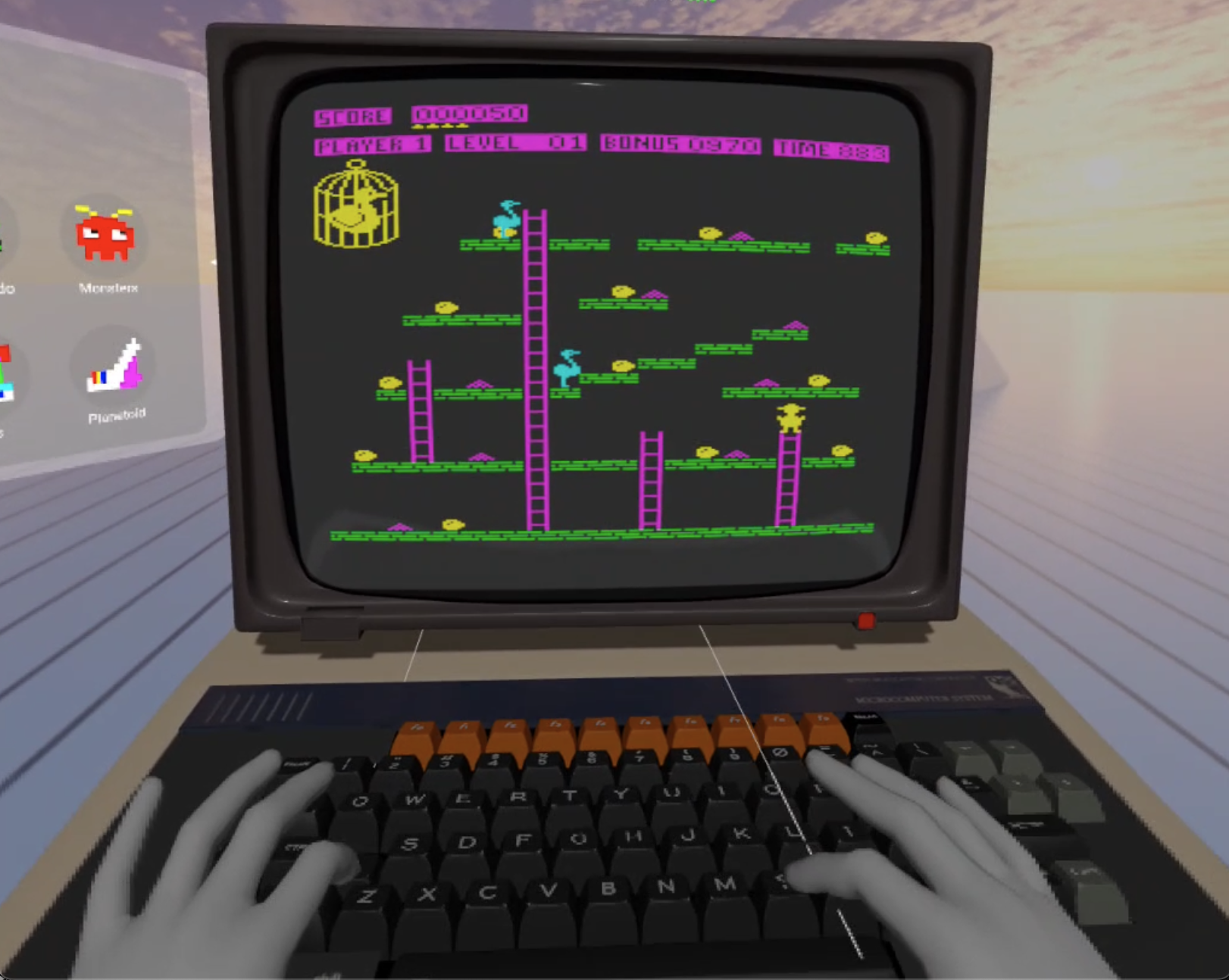
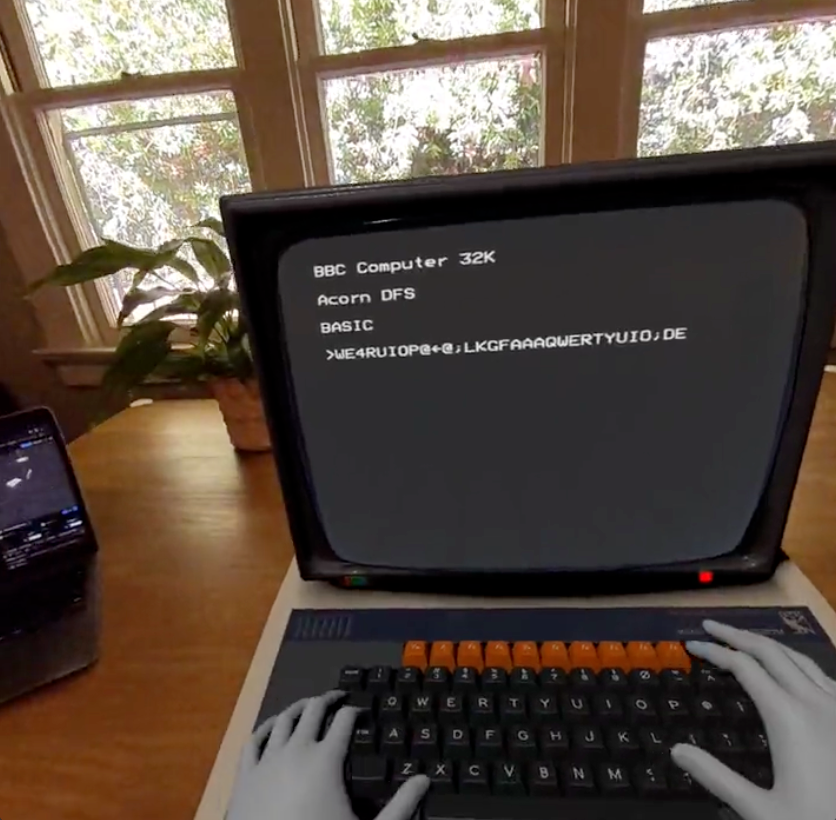
<p>Almost a year later, I chanced upon the <a href="https://threejs.org/examples/?q=hand#webxr_vr_handinput">Three.js Hand Tracking</a> example and realized I could quickly add support into virtual beeb and actually “type” on the keyboard. Yet again, the Three.js example and Oculus Hand Models meant I could drop similar code into my project and get a huge leap in capability:</p>
<p><img alt="Handtracking" src="https://www.dompajak.com/assets/images/handtracking-d47fc681425f35b0c59d007ad0b7c94c.png" width="1622" height="1294"></p>
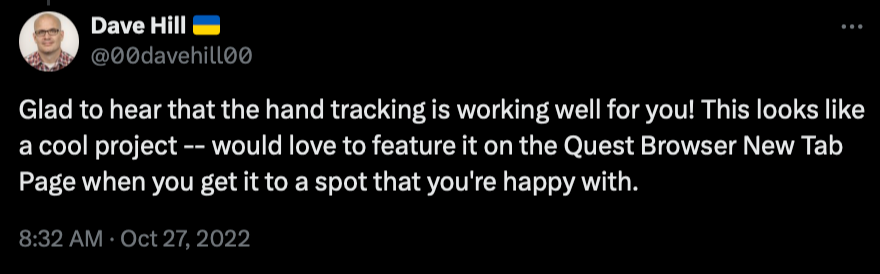
<p>Things were getting uncanny as I typed with my cold grey VR fingers, and it showed massive potential for a real VR experience people might actually enjoy. I posted progress up on Twitter and was surprised to get a comment from a Dave Hill, an engineering manager at Meta:</p>
<p><img alt="Book" src="https://www.dompajak.com/assets/images/quest-browser-tab-1c14342e5c4f7223f3e445515a61dfa5.png" width="880" height="274"></p>
<p>That was encouraging! But reality started to kick in when I realized how far I was from meeting <a href="https://developer.oculus.com/documentation/web/browser-new-tab/">Meta's WebXR content guidelines</a>, both in terms of UI and performance...</p>
<p>The holidays were over, I was back to actual work. I put the project on shelf for good, I thought.</p>
<h2 id="mixed-reality">Mixed-Reality</h2>
<p>The launch of Meta Quest 3 and excitement around the Apple Vision Pro announcement prompted me to post something cheeky on social media about them needing a killer app (also acknowledging my project had been dragging on for ages…).</p>
<p>To my surprise, I got a response from Mr Doob aka <a href="https://github.com/mrdoob/">Ricardo Cabello</a> - founder of Three.js - suggesting I should try the newly added <a href="https://github.com/mrdoob/three.js/commit/de2fbc63ff64077b3b33a44435c886b10f90aa3f">Three.js XR button</a> to enable Mixed-Reality:</p>
<p><img alt="xr" src="https://www.dompajak.com/assets/images/xrbutton-a124f53637297d1f586de0b044eedf64.png" width="888" height="134"></p>
<p>I was in Spain at that point and didn’t get back for several months to try his suggestion. Once I got back, I asked a friend at Meta if I could get a discount on a newly released Quest 3 to give it a try during the holidays. By swapping in the Three.js XR Button example, my project instantly got WebXR passthru “for free”.</p>
<p>I can’t overstate how empowering these Three.js examples were. My project, that once was limited to a desktop browser, was now solid and sitting convincingly on the table right in front of me!! It was another wow moment for me:</p>
<p><img alt="Book" src="https://www.dompajak.com/assets/images/mixed-reality-xr-beeb-9f9ffd6ea1fbd01c765eae5caa5dbbff.png" width="836" height="820"></p>
<h2 id="performance-issues">Performance issues</h2>
<p>It was time to get serious.</p>
<p>When I'd initally added VR, free look was smooth and I was excited it even worked at all. But unfortunately my project was a juddery mess if the user moved position. Reducing the polygon count helped a bit, but not enough. The original Virtual Beeb project was thrown together in record time and only a cursory “low hanging fruit” of optimization was done when I exported the model from Blender - I was lucky that it was enough for desktop and mobile. It was not enough for VR.</p>
<p>I’d discovered that (in retrospect, unsuprisingly) a mobile VR port is a serious project. There are two major factors going against you; On one hand, you have a less capable processor dealing with the 2x more polygons and draw calls needed for stereoscopic vision. On the other, VR is unforgiving of low framerates and jitter. The result? <em>My app would literally nauseate people</em>.</p>
<p>Fixing it looked like a lot of work. (And, yes, maybe using JavaScript to simulate a whole computer in a browser was a crazy bad idea in the first place.) Even if I did manage to smooth out performance, the hand tracking on the Meta Quest 2 had issues when fingers were partially occluded, so the keyboard interaction wasn’t really ready for prime time anyhow.</p>
<h2 id="optimization">Optimization</h2>
<p>Meta has some very good guides on <a href="https://developer.oculus.com/documentation/web/webxr-perf/">performance optimization</a> for WebXR. I applied pretty much every trick I could to squeeze under the fps limit; from simpler materials, merged meshes, fewer lights, lazy evaluation of shadows, instanced meshes, smaller textures. It was quickly apparent that the app was not GPU bound, rather CPU bound - too many draw calls with a significant load in running a full emulation of a BBC Micro behind the scenes.</p>
<h3 id="model">Model</h3>
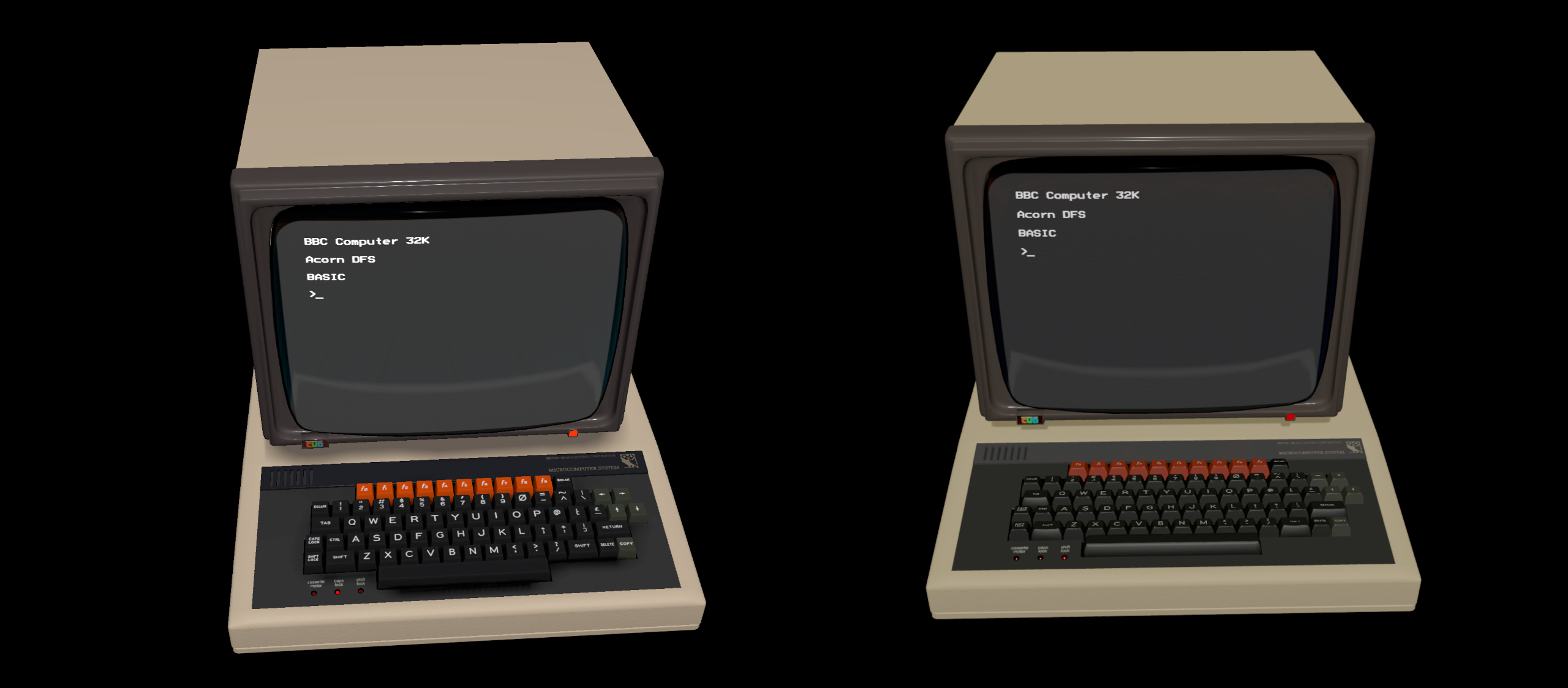
<p>After some decimation and vertex clean-up in Blender, the big model optimization wins were from using a new <a href="https://threejs.org/docs/#api/en/objects/InstancedMesh">instanced mesh</a> for 1U keys and applying <a href="https://threejs.org/docs/#examples/en/loaders/DRACOLoader">DRACO compression</a> to the GLTFs. This resulted in halving the draw calls and polygon count for the model; and the result actually looked better!</p>
<p><img alt="Optimized" src="https://www.dompajak.com/assets/images/optimized-71458e94eecd333a784044aa192a080a.png" width="2560" height="1124"></p>
<p><strong>Scene complexity (Immersive XR mode doubles this):</strong></p>
<pre><code>virtual.bbcmic.ro (left)
calls: 102
triangles: 173K
</code></pre>
<pre><code>xr.bbmic.ro (right)
calls: 23
triangles: 38K
</code></pre>
<h3 id="emulation-web-worker">Emulation Web Worker</h3>
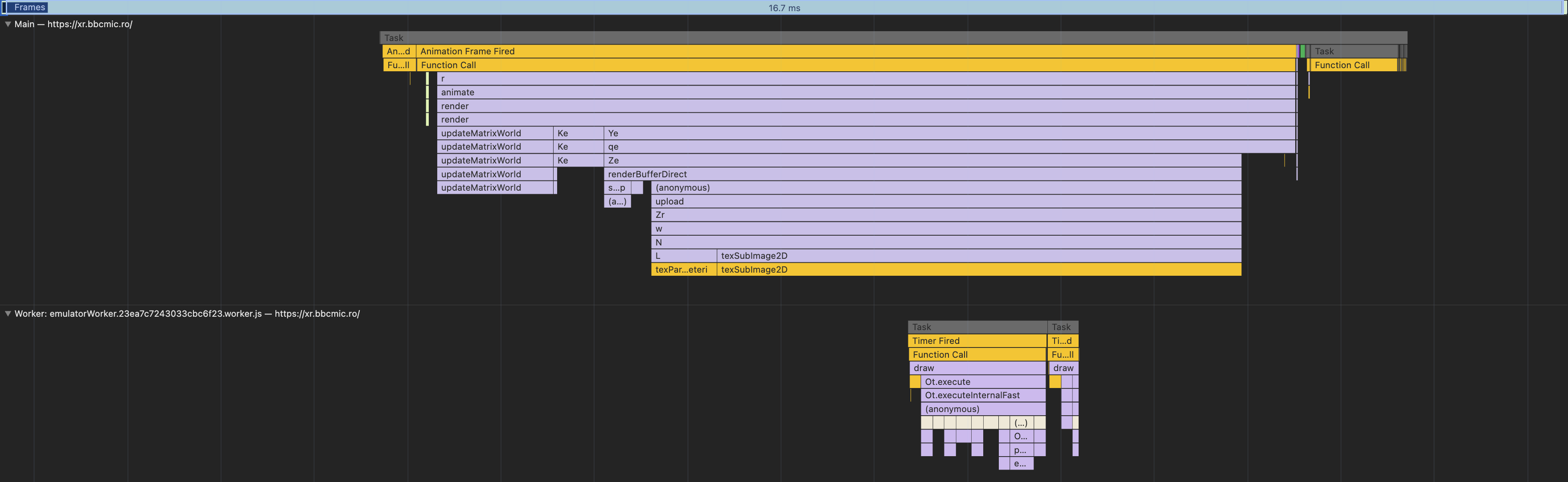
<p>The elephant in the room (or rather, on the main thread) was a whole BBC Micro emulator making the renderer judder.</p>
<p><img alt="Optimized" src="https://www.dompajak.com/assets/images/virtual-profile-a690eba623c2a413da4cc0603edf7204.png" width="3540" height="594">
(Graphs are 6x throttled performance on desktop Chrome targeting 16.7ms / 60 fps for illustration purposes - hand tracking models slowed this to ~45fps on Meta Quest 3 before optimization)</p>
<p>The solution lay in putting JSBeeb in a <a href="https://developer.mozilla.org/en-US/docs/Web/API/Web_Workers_API/Using_web_workers">Web Worker</a>, and using message passing to communicate key presses, sound sample buffer events, LED light changes, etc. between the emulator thread and the scene renderer on the main thread. This smoothed things out considerably, but for good measure I also set the <a href="https://www.w3.org/TR/webxr/#dom-xrsession-updatetargetframerate">target frame rate</a> to 72 fps down from 90 fps.</p>
<p>One final big optimization was to remove frame blanking and double buffering from the emulator implementation. Instead, I used a <code>SharedBufferArray</code> so the frame buffer from the emulation Web Worker was accessible by the main thread. Every VSYNC (50Hz, as the BBC Micro follows UK TV standards) an updated screen texture was copied to the GPU. Removing frame blanking in JSbeeb saved more cycles and worked OK, providing I implemented conditional blanking based on writes to certain CRTC registers in the emulation (Rich Talbot-Watkins was to thank for that tip).</p>
<h3 id="result">Result</h3>
<p><img alt="Optimized" src="https://www.dompajak.com/assets/images/webxr-profile-e24a8814fc0e57d6d2489ef689c70705.png" width="3518" height="1082"></p>
<p>Now XR Beeb ran at a smooth 72 fps on Meta Quest 3 in passthru with handtracking - although if you are very determined you can still get the fps to dip with some violent and sustained mashing of the VR keyboard (It was part of the testing.)</p>]]></content>
        <author>
            <name>Dominic Pajak</name>
        </author>
        <category label="bbcmicro" term="bbcmicro"/>
        <category label="webxr" term="webxr"/>
        <category label="simulation" term="simulation"/>
        <category label="emulation" term="emulation"/>
    </entry>
    <entry>
        <title type="html"><![CDATA[BBC Micro USB Keyboard]]></title>
        <id>https://www.dompajak.com/blog/bbc-micro-usb-keyboard</id>
        <link href="https://www.dompajak.com/blog/bbc-micro-usb-keyboard"/>
        <updated>2023-01-01T00:00:00.000Z</updated>
        <summary type="html"><![CDATA[Deep into the pandemic you might remember BBC Microbot Live! - we livestreamed BBC Micro Bot on YouTube during an episode of Arduino TV, and had a real live BBC Micro sitting there running peoples programs. Amazingly, it worked!]]></summary>
        <content type="html"><![CDATA[<p>Deep into the pandemic you might remember <strong>BBC Microbot Live!</strong> - we livestreamed BBC Micro Bot on YouTube during an episode of Arduino TV, and had a real live BBC Micro sitting there running peoples programs. Amazingly, it worked!</p>
<p>Lorem ipsum dolor sit amet, consectetur adipiscing elit. Pellentesque elementum dignissim ultricies. Fusce rhoncus ipsum tempor eros aliquam consequat. Lorem ipsum dolor sit amet</p>]]></content>
        <author>
            <name>Dominic Pajak</name>
        </author>
        <category label="bbcmicro" term="bbcmicro"/>
        <category label="hardware" term="hardware"/>
        <category label="keyboard" term="keyboard"/>
    </entry>
    <entry>
        <title type="html"><![CDATA[BBC Micro with Gotek floppy drive]]></title>
        <id>https://www.dompajak.com/blog/bbc-micro-gotek-floppy-drive</id>
        <link href="https://www.dompajak.com/blog/bbc-micro-gotek-floppy-drive"/>
        <updated>2023-01-01T00:00:00.000Z</updated>
        <summary type="html"><![CDATA[Bought a generic Gotek from Amazon which failed to behave with my BBC Micro Model B.]]></summary>
        <content type="html"><![CDATA[<p>Bought a generic Gotek from Amazon which failed to behave with my BBC Micro Model B.</p>
<h2 id="reflashing-gotek-bootloader">Reflashing Gotek bootloader</h2>
<p>With a USB A to USB A cable and following <a href="https://github.com/keirf/flashfloppy/wiki/Firmware-Programming">these instructions</a> it all worked out well flashing the bootloader to get the F-F display on the LED display.</p>
<p>sudo dfu-util -a 1 -s :unprotect<!-- -->:force<!-- --> -D flashfloppy-at415-st105-4.6a.dfu
sudo dfu-util -a 0 -D  flashfloppy-at415-st105-4.6a.dfu</p>
<h2 id="updating-flashfloppy">Updating FlashFloppy</h2>
<p>Stick a FF.CFG file in the root containing</p>
<pre><code>interface = shugart
host = acorn
index-suppression = no
rotary = none
</code></pre>
<h2 id="dropping-in-your-ssd-files">Dropping in your .ssd files</h2>
<p>Called them <code>DSKA0000.ssd</code> etc</p>
<p>Done!</p>]]></content>
        <author>
            <name>Dominic Pajak</name>
        </author>
        <category label="bbcmicro" term="bbcmicro"/>
        <category label="hardware" term="hardware"/>
        <category label="floppy" term="floppy"/>
    </entry>
    <entry>
        <title type="html"><![CDATA[Welcome]]></title>
        <id>https://www.dompajak.com/blog/welcome</id>
        <link href="https://www.dompajak.com/blog/welcome"/>
        <updated>2021-08-26T00:00:00.000Z</updated>
        <summary type="html"><![CDATA[Docusaurus blogging features are powered by the blog plugin.]]></summary>
        <content type="html"><![CDATA[<p><a href="https://docusaurus.io/docs/blog">Docusaurus blogging features</a> are powered by the <a href="https://docusaurus.io/docs/api/plugins/@docusaurus/plugin-content-blog">blog plugin</a>.</p>
<p>Simply add Markdown files (or folders) to the <code>blog</code> directory.</p>
<p>Regular blog authors can be added to <code>authors.yml</code>.</p>
<p>The blog post date can be extracted from filenames, such as:</p>
<ul>
<li><code>2019-05-30-welcome.md</code></li>
<li><code>2019-05-30-welcome/index.md</code></li>
</ul>
<p>A blog post folder can be convenient to co-locate blog post images:</p>
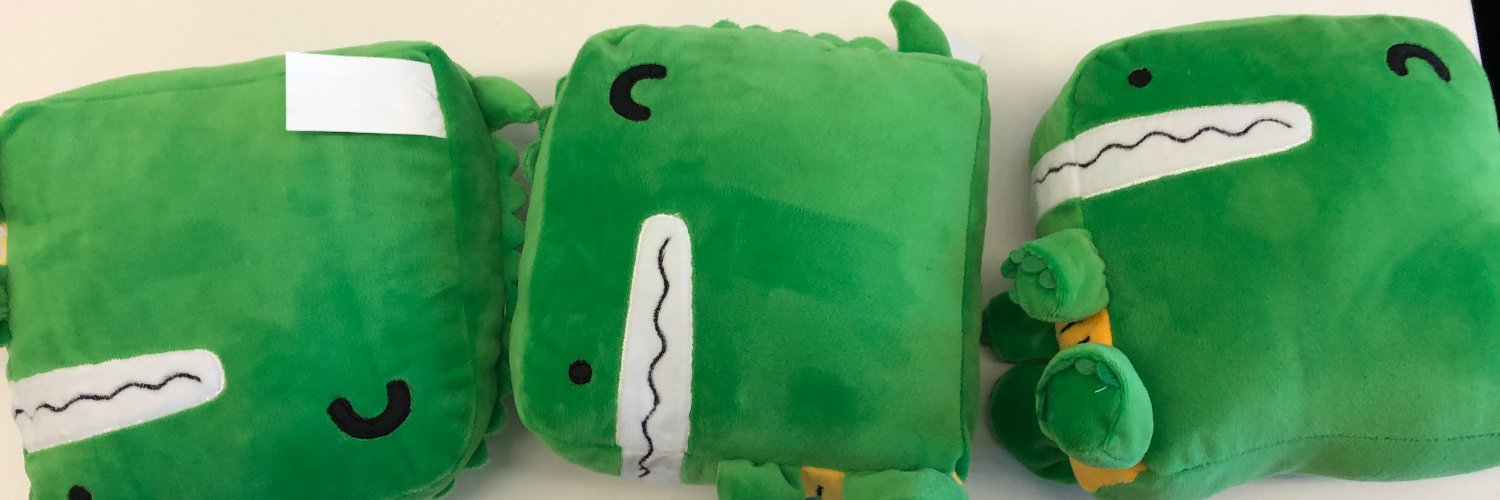
<p><img alt="Docusaurus Plushie" src="https://www.dompajak.com/assets/images/docusaurus-plushie-banner-a60f7593abca1e3eef26a9afa244e4fb.jpeg" width="1500" height="500"></p>
<p>The blog supports tags as well!</p>
<p><strong>And if you don't want a blog</strong>: just delete this directory, and use <code>blog: false</code> in your Docusaurus config.</p>]]></content>
        <author>
            <name>Sébastien Lorber</name>
            <uri>https://sebastienlorber.com</uri>
        </author>
        <author>
            <name>Yangshun Tay</name>
            <uri>https://github.com/yangshun</uri>
        </author>
        <category label="facebook" term="facebook"/>
        <category label="hello" term="hello"/>
        <category label="docusaurus" term="docusaurus"/>
    </entry>
    <entry>
        <title type="html"><![CDATA[MDX Blog Post]]></title>
        <id>https://www.dompajak.com/blog/mdx-blog-post</id>
        <link href="https://www.dompajak.com/blog/mdx-blog-post"/>
        <updated>2021-08-01T00:00:00.000Z</updated>
        <summary type="html"><![CDATA[Blog posts support Docusaurus Markdown features, such as MDX.]]></summary>
        <content type="html"><![CDATA[<p>Blog posts support <a href="https://docusaurus.io/docs/markdown-features">Docusaurus Markdown features</a>, such as <a href="https://mdxjs.com/">MDX</a>.</p>
<admonition type="tip"><p>Use the power of React to create interactive blog posts.</p><pre><code class="language-js">&lt;button onClick={() =&gt; alert('button clicked!')}&gt;Click me!&lt;/button&gt;
</code></pre><button>Click me!</button></admonition>]]></content>
        <author>
            <name>Sébastien Lorber</name>
            <uri>https://sebastienlorber.com</uri>
        </author>
        <category label="docusaurus" term="docusaurus"/>
    </entry>
    <entry>
        <title type="html"><![CDATA[Long Blog Post]]></title>
        <id>https://www.dompajak.com/blog/long-blog-post</id>
        <link href="https://www.dompajak.com/blog/long-blog-post"/>
        <updated>2019-05-29T00:00:00.000Z</updated>
        <summary type="html"><![CDATA[This is the summary of a very long blog post,]]></summary>
        <content type="html"><![CDATA[<p>This is the summary of a very long blog post,</p>
<p>Use a <code>&lt;!--</code> <code>truncate</code> <code>--&gt;</code> comment to limit blog post size in the list view.</p>
<p>Lorem ipsum dolor sit amet, consectetur adipiscing elit. Pellentesque elementum dignissim ultricies. Fusce rhoncus ipsum tempor eros aliquam consequat. Lorem ipsum dolor sit amet</p>
<p>Lorem ipsum dolor sit amet, consectetur adipiscing elit. Pellentesque elementum dignissim ultricies. Fusce rhoncus ipsum tempor eros aliquam consequat. Lorem ipsum dolor sit amet</p>]]></content>
        <author>
            <name>Endilie Yacop Sucipto</name>
            <uri>https://github.com/endiliey</uri>
        </author>
        <category label="hello" term="hello"/>
        <category label="docusaurus" term="docusaurus"/>
    </entry>
</feed>